
I stopped sending my meetings to the cloud
It takes me 47 minutes of computing to transcribe a one-hour meeting, locally on my laptop. What I adapted in Meetily, and what it fixes for GDPR.
We no longer need to take notes or write meeting minutes! And that is real progress... But the main recording and transcription tools are usually paid services and, above all, built on cloud processing.
Otter has been facing several complaints since 2025, consolidated before a California federal court: it is accused of recording participants who never signed anything, and of using that content to train its models. Fireflies, which I was using, has been targeted since December 2025 by two class actions in Illinois, on the grounds that its speaker recognition would create voiceprints without the written consent required by the local biometric data law. Nothing has been ruled on to date, these are accusations. But it remains a real issue.
In early July, I saw a post on LinkedIn introducing Meetily, an open-source meeting assistant that runs on its user's machine. (PS: I wanted to find that post again to credit and thank the author, but in LinkedIn's infinite scroll... impossible!). So I dove in, and it let me work on two topics at once: improving how I handle confidential data, and finally trying to run a model locally.
I'm still in a break-in period, but I haven't used cloud transcription for three weeks and I'm convinced by the result. In this article, my experience with it.
1. The problem: sensitive meetings passing through third-party servers
The meeting assistants on the market share a common architecture. A software agent joins the video call or hooks directly into the computer's audio, and sends the sound to the vendor's servers in the cloud, where the transcript and the summary are produced. Otter, Fireflies and Plaud all work on this principle, with some variants (Granola processes audio locally and only sends text out for the summary).
As soon as you work in a field with confidential data (for the company) and/or sensitive data (GDPR), this is a problem. Any meeting can mention information that was never meant to be handled by a subprocessor (our transcription tool training its models on it, for example!). And for the record, the voice itself is personal data, and it becomes biometric data as soon as it can identify a person (Article 9 of the GDPR).
The same problem is at the origin of the Meetily initiative: a law firm asking for AI-assisted meeting minutes while ruling out any cloud tool, since professional secrecy requires full control over the data. The vendor cites three audiences blocked by the cloud: law firms, healthcare professionals, financial services.
Now I just need to find out whether it can run on my machine...
2. Adapting Meetily
2.1 A fork of Meetily
With my favourite AI (yes, even though I'm trying to do without it, I do plenty of things with it that I couldn't do on my own, including forking an existing git repo!), I clone the Meetily code and run it as is, locally. And there, like magic, it just works: the recording runs, the text shows up. And I immediately spot what I want to adapt so it fits my needs better:
- remove the meeting minutes part. I already have a whole separate process that handles it. I'll spare you the details of that removal, it's not the most interesting part.
- add diarization (ok, I didn't know that word either, it just means "recognizing who is speaking").
I check the terms of Meetily's license: it's MIT, I'm allowed to adapt the code, including for professional use.
GO!
2.2 Giving up live transcription
Attempt 1: the default model really doesn't perform well in French. So I switch models and try Whisper large-v3-turbo in real time, which needs about 8 seconds of processing for 5 to 6 seconds of speech on an integrated GPU. The queue keeps growing as the meeting goes on, and latency quickly exceeds 15 seconds... Not viable.
So I decided to let go of the idea of a live, faithful transcript: I'm in the meeting, I don't need to read the transcription in real time.
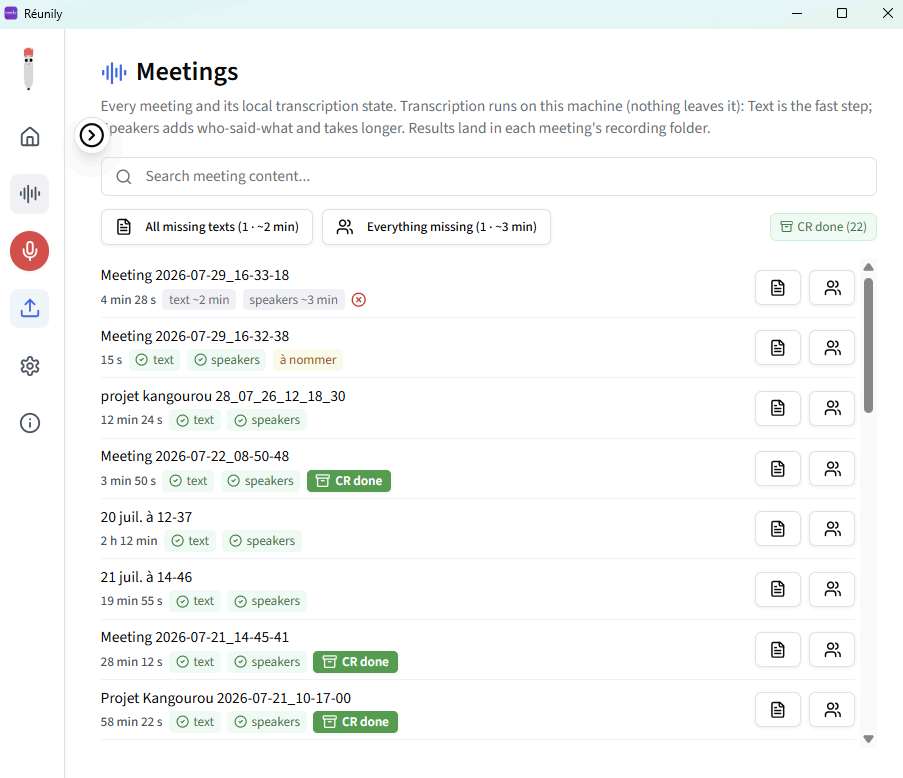
I modify the tool so I can launch the transcription, calmly, after my meetings. It works, and it isn't even that long: about 8 minutes for 1 hour of meeting.
2.3 Providing context
Attempt 2: I record in parallel, locally and with my usual cloud tools. And I compare transcription quality... and I'm not impressed. It's downright terrible on proper nouns (fair enough, none of them transcribe that kind of word correctly), but it also trips over all the technical vocabulary ("backlog" becomes "patelot")!
I make several improvements at once:
- I switch models again, moving to Whisper large-v3 (no more turbo).
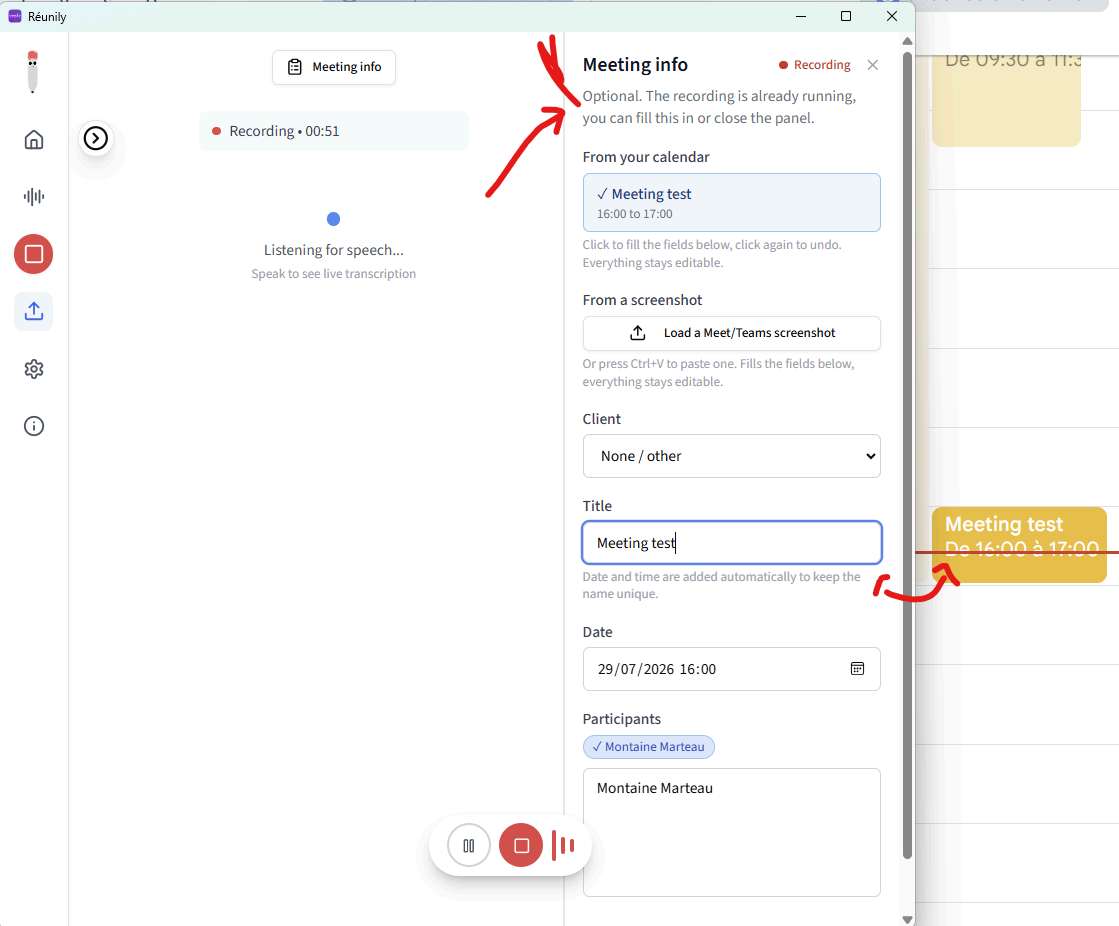
- Even though I'm no specialist, I figure that giving it more context will make it more effective. A small development to automatically suggest information from my calendar to confirm the company name and the participants' names (such a magical idea!). ➜ the metadata
- And I wonder whether I could include a dictionary of my technical terms. Actually, the space available in Whisper's prompt is tiny (400 characters). What I do anyway is extract my vocabulary from my existing transcripts (e.g. HDS, I work in MedTech). ➜ the glossary
OK... it really is longer for each transcription. But it works so well!!! As long as I spend less time in meetings than out of meetings on any given day... it's workable.
2.4 Diarizing
I'm on a roll, nothing can stop my experiments now. So why not recognize the speakers. I know it's a complicated task. But since my cloud tools aren't fantastic at it either, I might as well do "not fantastic" locally.
Attempt 3: a quick state of the art, and I went with pyannote.audio 4 (the speaker-diarization-community-1 model, free and under a CC-BY license). After a few recorded meetings, a small comparison between Fireflies, Google Meet and my local version. Fireflies does a bit better, without being extraordinary either. So my local version suits me, except for the time it took on my CPU. I have an Intel GPU (poor me!), but there is a version of PyTorch that knows how to use it. I switched diarization over to it and there... once again... magic! Three and a half times faster, and I checked that the result was rigorously identical, byte for byte. It's usable! (Too bad I can't do the same with Whisper: the component it relies on underneath can't talk to an Intel GPU.)
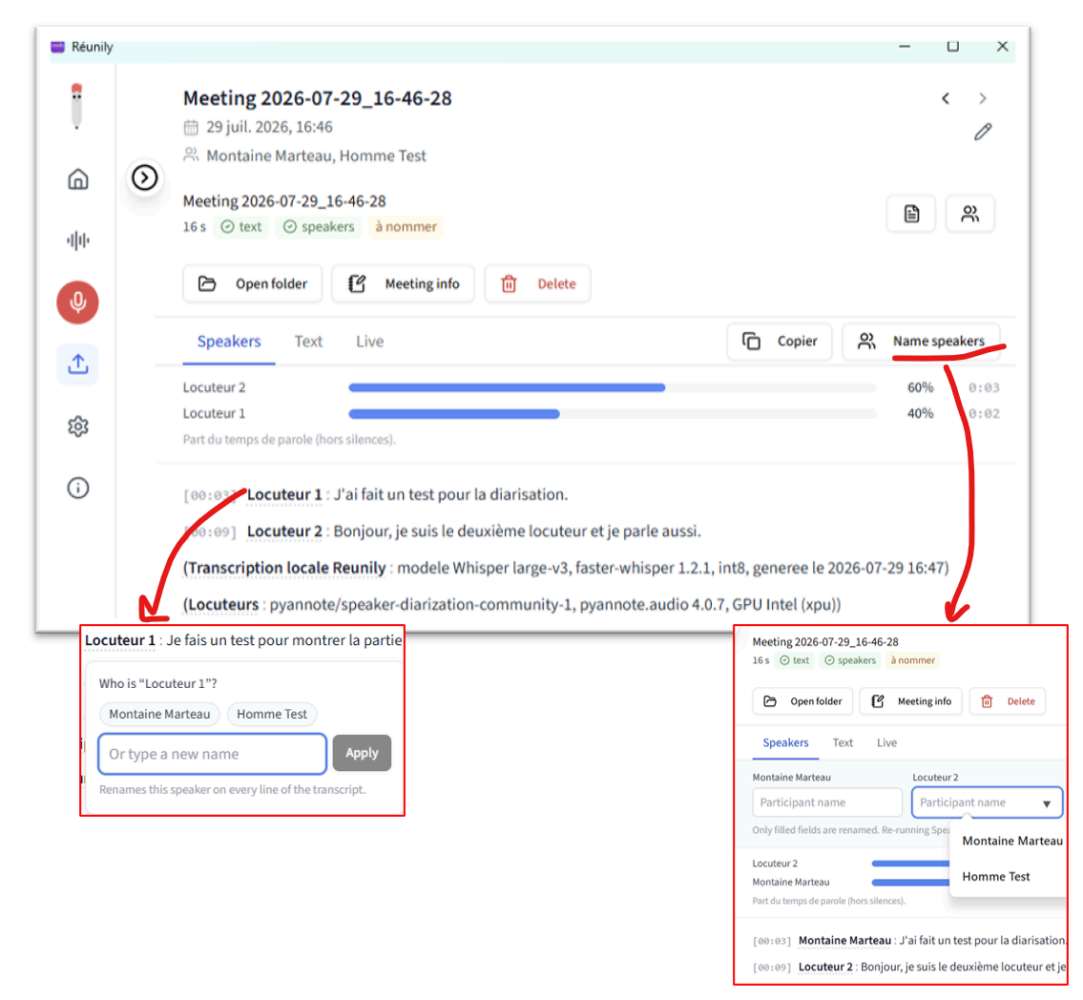
I didn't try to have speakers recognized automatically. I do it by hand for each meeting. It may be my next improvement (but since I would always want to check whether the matching is correct, verifying might take me as long as doing it myself).
3. The Bonuses - in no particular order
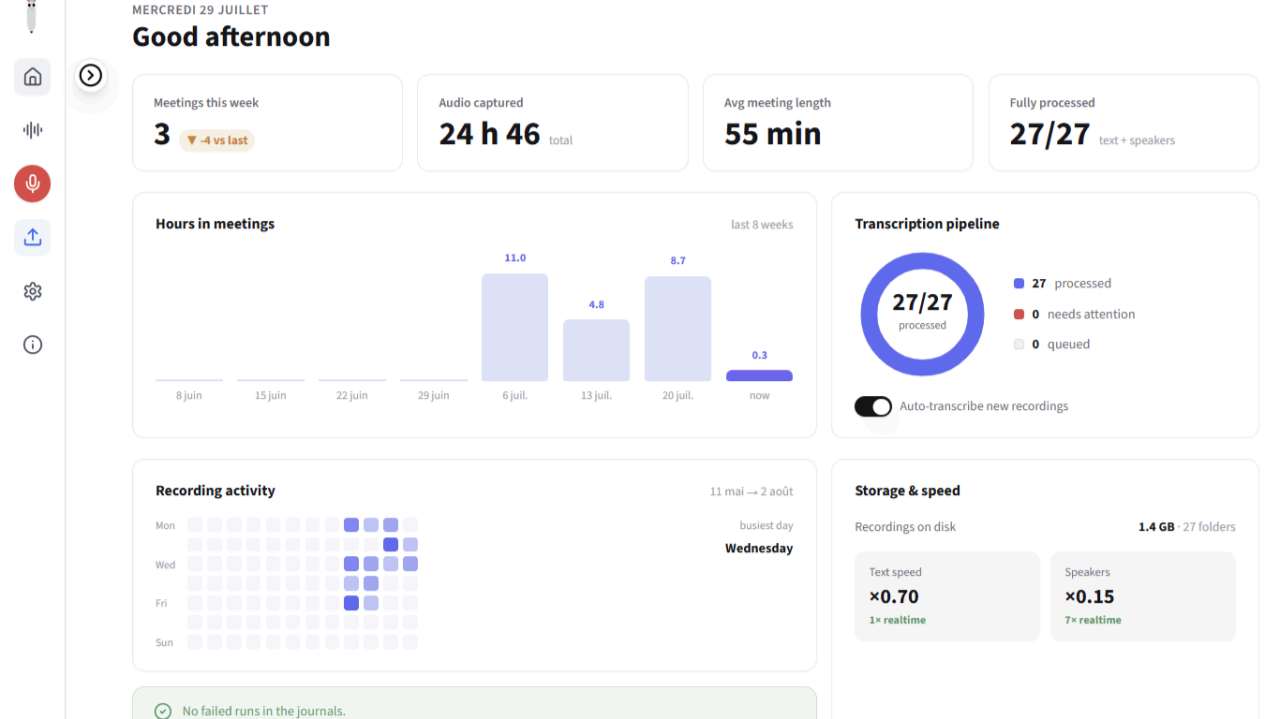
- I built myself a little dashboard with the information that really matters to me (and some just for fun!). ➜ For instance, speaking time per speaker.
- It's fully integrated into my RAG process (Second Brain). ➜ for instance, the indication that the meeting minutes have been ingested.
- I got it to work just as well with a headset as without one (and yes, the audio track doesn't come in the same way). But I haven't tested switching devices mid-meeting... not sure my audio recording would keep up.
- I manage the retention policy of my files myself (you know that end-of-subscription moment when you lose access to your files?)
- No data transferred outside the EU, and no model trained on my data.
4. Results
My laptop: a portable computer with an Intel Core Ultra 7 258V processor (8 cores), 32 GB of memory, and an integrated Intel Arc 140V GPU.
Processing time:
Duration of each step, for one hour of meeting.
| Step | Duration | Factor |
|---|---|---|
| Transcription large-v3-turbo | about 8 min | 0.13 times the audio duration |
| Transcription large-v3 | about 39 min | 0.66 times the audio duration |
| pyannote diarization on CPU | about 27 min | 0.45 times the audio duration |
| pyannote diarization on GPU | about 8 min | 0.13 times the audio duration |
Total time between the end of the meeting and a speaker-attributed transcript. Diarization adds to transcription, it does not replace it.
| Configuration | Total for one hour of meeting |
|---|---|
| large-v3-turbo and diarization on GPU | about 16 min |
| large-v3-turbo and diarization on CPU | about 35 min |
| large-v3 and diarization on GPU (chosen setup) | about 47 min |
| large-v3 and diarization on CPU | about 66 min |
5. Sources
If you want to give it a try yourself:
- the Meetily git repo: github.com/Zackriya-Solutions/meetily
- to use pyannote: huggingface.co/pyannote
On the ongoing proceedings, if the topic interests you:
- the action against Otter.ai (In re Otter.AI Privacy Litigation, N.D. Cal., No. 5:25-cv-06911), summarized by the National Law Review: natlawreview.com
- the complaint against Fireflies.AI and what it says about voiceprints, analyzed by Epstein Becker Green: ebglaw.com
Have fun!!
Product, innovation and MedTech field notes
Frameworks, methods, field feedback. Let us talk for 30 minutes to see what applies to your context.
Book a slot →
Thank you. Your comment will be published after review.